Working with CSV Exports
Computer Inventory and Plugin result data can be exported as a .csv (comma separated values) formatted file from your dashboard.
CSV File Format
Files are exported in the standard UTF-8 encoded, comma-separated files with unix (lf) line endings.
Data containing special characters (computer name, result data, etc) are wrapped in double-quotes.
Warning
Some exported files may not be readily imported by Apple’s Numbers.app or Microsoft Excel.
Tip
Create a CSV Export Template that excludes potentially problematic fields such as Computer Name, Computer Description, or Group Description for import into Numbers or Excel.
Note
There is a known issue when computer names contain double quotes or Descriptions have carriage returns. Despite escaping, the resulting .csv export will not open properly. Using a text editor, such as BBEdit, can remove the excess quotes, allowing for the CSV to be processed further.
Alternative Editor(s)
We have found Easy CSV Editor and Table Tool (both available on the Mac App Store) have been effective in opening and managing the data.
Warning
For stale plugins,
[stale]maybe prefixed to the plugin name.
Importing in to Numbers
Opening with Numbers
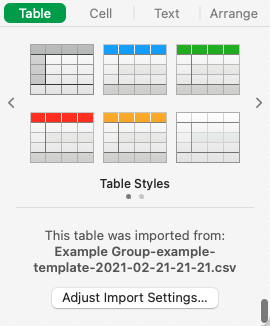
When opening with Numbers, Numbers will automatically import the CSV file. The import settings can be modified after the import by clicking Adjust Import Settings…
In the Format sidebar, click the Table tab, then click Adjust Import Settings.
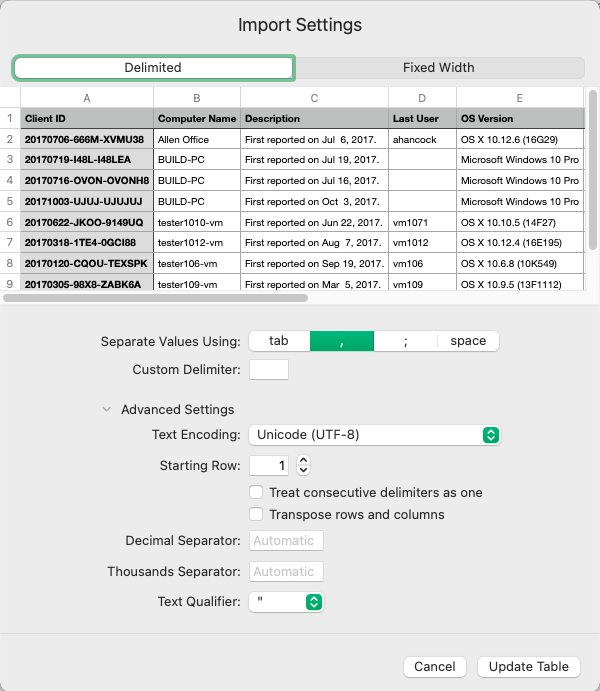
Under Advanced Settings the Text Encoding: can be modified if not detected as UTF-8, along with other settings related to the import.
Importing in to Excel
Excel CSV Import
The File Origin can be set in Excel’s Import function to UTF-8, handling some formatting issues related to unique characters.
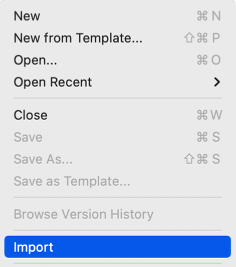
In Excel, choose File > Import.
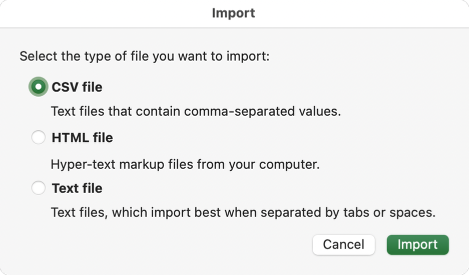
Select CSV file in the Import modal, then click Import.
From the File origin dropdown, select Unicode (UTF-8) on step 1 of the Text Import Wizard.
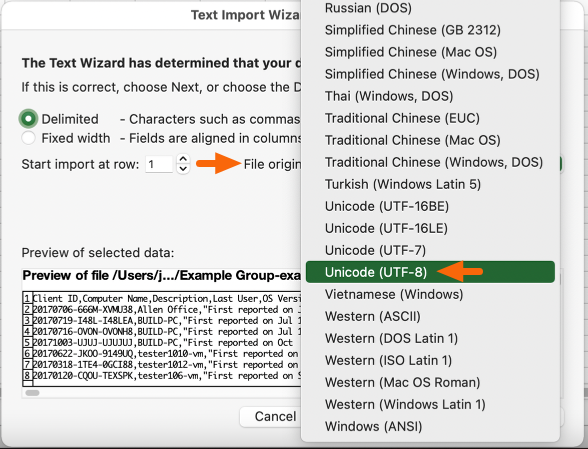
Proceed with the Text Import Wizard to finish importing the CSV file.
Permalink: https://watchmanmonitoring.com/csv-exports