Extending the Contact Menu with liquid variables
You can extend the Contact Menu with variables such as the Asset ID, Group, Watchman ID or subdomain. Liquid variables allow you to insert dynamic data points into your contact menu allowing for unique links and identifying information.
Watchman Monitoring Liquid Variables
- `` - The Asset ID Field.
- `` - Group Name.
- `` - The subdomain the agent reports to (especially helpful for Managed Accounts)
- `` - The Watchman Monitoring unique ID for the computer.
- `` - A synonym for WatchmanID.
- `` - A synonym for Group.
- `` - The Serial Number of the computer.
- `` - The Reference Email for the computer or group.
- `` - The Reference Email for the Computer.
- `` - The Reference Email for the Group.
Using Watchman Monitoring Liquid Variables.
Watchman Monitoring Liquid Variables can be placed in any text, URL or URI field for a contact menu item. The most basic implementation is to display these variables using the grey text contact menu item option.
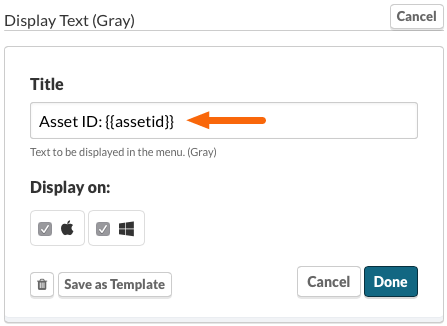
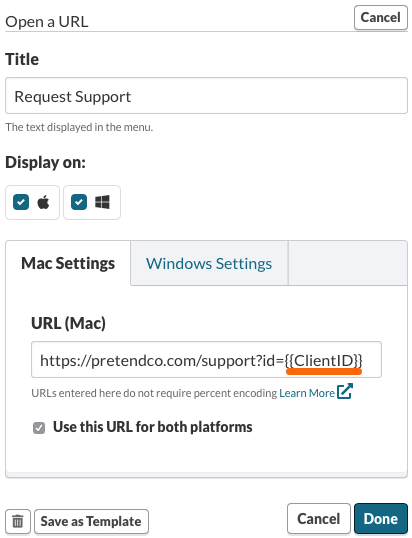
Liquid variables can also be used in URLs. You could create a support request form in your favorite form tool to accept the liquid variable. This allows you to pass additional information about the computer end point requesting help or support.
Ideas
Group
Title: All Support Request for
Link to Ticketing System Group Tickets
Title: Links for
Display Text (Gray)
Watchman ID
URL: https://example.com/support?id=
Link to Support Request Form, passing Watchman ID
Asset ID
Title: Computer ID:
Display Text (Gray)
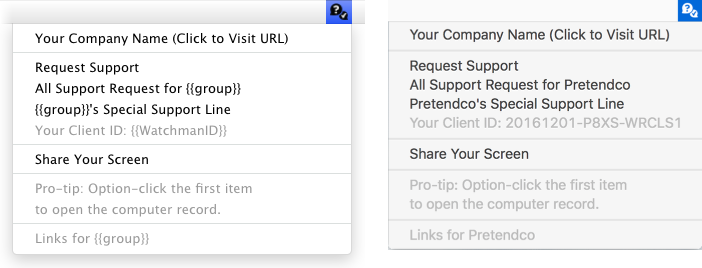
This is an example of the menu with liquid variables. On the left is the menu as it is displayed in the Dashboard, and on the right, is the live contact menu.
Reference Email
URL: https://example.com/support?from=
Link to Support Request Form, passing the computer or group reference email.
This is an example of the menu with liquid variables. On the left is the menu as it is displayed in the Dashboard, and on the right, is the live contact menu.
Related Articles
Permalink: https://watchmanmonitoring.com/contact-menu-variables