Using Apple Remote Desktop to deploy the Monitoring Client
The following details how to use Apple Remote Desktop to deploy the Monitoring Client using the send unix command and the scripted installation option from the Dashboard.
Apple Remote Desktop
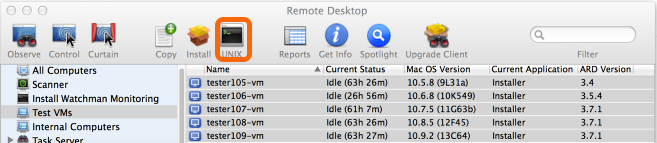
Select the computers to install the Monitoring Client, and click the UNIX button.
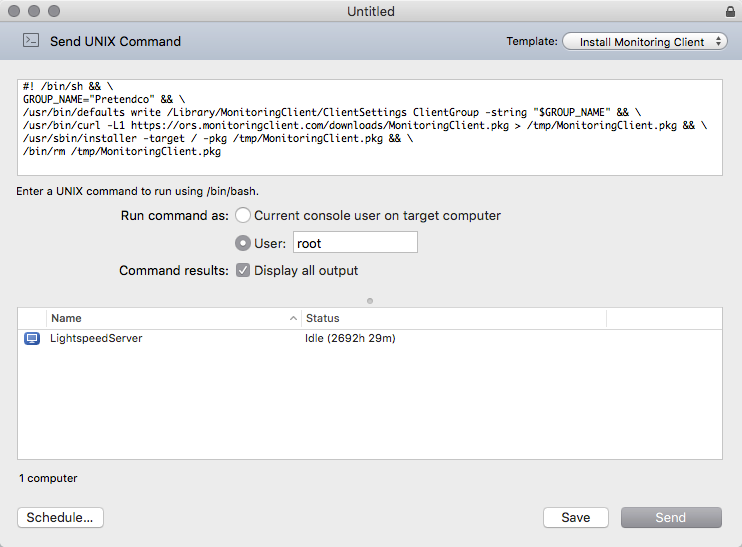
Here we see that installation can be handled with a single command, sent as root.
- The first command uses defaults write to set the Group in place.*
- The following command downloads the installer and saves it to /tmp
- Then installer is invoked to finish the deployment.
- Finally, the source pkg is removed.
Tip
Save this command as a Template in Apple Remote Desktop for on-demand deployment of the latest client whenever the need arises.
Obtaining Your Custom Remote Desktop Script
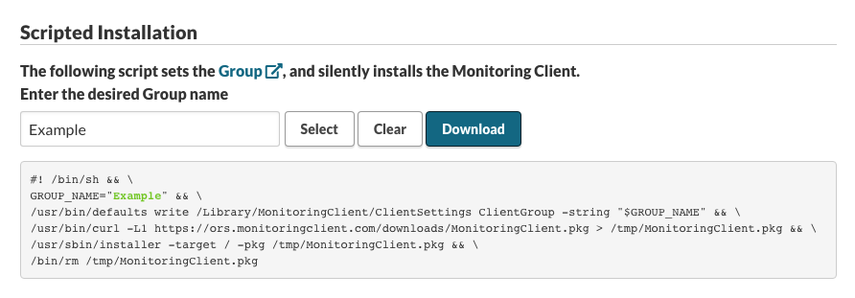
From the Mac Installer in your Dashbaord, and scroll to Scripted Installation to copy or download your customized script.
Fill in the desired group name then copy the text for use in Remote Desktop.
Permalink: https://watchmanmonitoring.com/apple-remote-desktop