Monitoring Client for Windows-based computers
Watchman Monitoring is a cross-platform solution with agents for the Mac, Linux, and Windows platforms. Watchman Monitoring supports Windows XP SP3 or greater, Server 2003 or greater; .net 4.0 or greater is required.
System Requirements
- Windows XP SP3 or greater, Server 2003 or greater; .net 4.0 or greater required
Warning
Administrator access is required for installation and configuration.
Important
Windows Server 2003 does not support secure versions of TLS and will only report via HTTP not HTTPS.
Deployment options
The agent is delivered in an MSI.
The Monitoring Client can be installed silently via the command line. It can also have options be passed to it.
msiexec /i “https://SUBDOMAIN.monitoringclient.com/downloads/MonitoringClient.msi” /quiet ‘CMDLINE=”GROUP=”“Test Group”””’
In addition to GROUP, SUBDOMAIN can also be set.
Optionally, a .reg file is also provided, useful for setting the Client Group in mass-deployments.
Features
Antivirus
-
Reports that AntiVirus package is installed and up to date. We’ll check for these:
- Generic Antivirus
- Avast
- AVG
- Emsisoft
- Kaspersky
- MalwareBytes
- Symantec
- Webroot
Backup
-
Will check for these:
- ArcServe
- BackBlaze
- Carbonite
- Crashplan
- Macrium Reflect
- Mozy
- Retrospect
- Veeam
- Windows Backup
Battery
• Checks and reports on portable (laptop) battery status and degradation.
Bitlocker
- Drives that have bitlocker enabled are automatically discovered and monitored.
CPU
- Reports on status of the Central Processing Unit (CPU).
Disk IO Errors
• Reports on any Disk Input/Output Errors
Device Manager
- Reports on issues found with the Device Manager.
Firewall
- Reports firewall is enabled and functioning.
Flash
- Reports if flash is installed and the version.
Local IP Address
- Reports current local IP address.
Microsoft Office
- Reports Microsoft Office version installed.
Operating System
- Reports any issues with the core OS.
Printer
- Reports printer issues.
RAM
- Reports memory installed and any errors discovered.
RDP
- Reports on any issues found with Remote Desktop Protocol.
Root Capacity
- Reports on the root capacity of the primary hard drive.
Screensharing Tools
• Reports status and provides integration links for:
• Bomgar
• TeamViewer
SMART
• Reports on SMART Errors found on system connected hard drives and solid state drives.
Users
- Reports on password attempts, privilege level, and domain.
Windows Activation
- Reports Windows license status.
Windows Defender
- Reports Windows Defender status and threats found.
Windows Disk Cleanup
- Reports on Windows Disk Cleanup status.
Windows Update
- Reports on total updates pending installation.
WMI Connection
- Reports on Windows Management Instrumentation (WMI) enrollment.
Windows Activation
- Checks for Windows license status and issues
With more plugins added regularly.
Trouble Reports
Using the Plugin Support (?) button queues a request to Watchman Monitoring’s support staff. This includes details about the computer itself and includes all the report details. You will have the opportunity to include more information you may have on the matter.
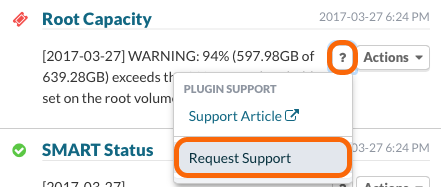
Learn more about plugin support here: https://watchmanmonitoring.com/about-plugin-support
Permalink: https://watchmanmonitoring.com/windows-deployment