Setting Backup Warning Thresholds
Thresholds for individual backup plugins can be set per backup plugin. The following provides an overview of accessing the warning threshold(s), setting the threshold(s) and details affected backup plugins
Note
The default number of days before a backup is considered stale is 7 days.
Affected Backup Plugins
The following plugins allow for customization of the default number of days before a backup is considered stale:
Windows
- ArcServe
- BackBlaze
- Carbonite
- CasperBackup
- Crashplan Client
- Macrium Reflect
- Mozy
- Retrospect Client
- Synchronicity
- Veeam
- Windows Backup
Mac
- To be announced
Setting Backup Plugin Warning Thresholds
Windows
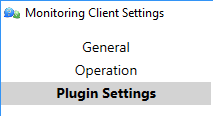
Open the Monitoring Client Control Panel and navigate to Plugin Settings.
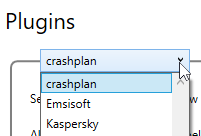
Using the drop down menu, select the plugin to view and edit configuration settings.
Deselect Monitor Backups to disable the sending of notifications of stale backups.
With Monitor Backups selected, you can adjust the warning threshold for stale backups by adjusting the days in Warn if Backup is older than X day(s).
Mac
To be announced
Permalink: https://watchmanmonitoring.com/backup-warning-thresholds