Disabling Plugins
Individual Monitoring Client Plugins can be disabled on the computer using the Preference Pane, Control Panel, or Command Line. Muting or Ignoring a plugin is a preferred method for squelching a noisy plugin.
Warning
Disabling a Plugin will prevent the plugin from running, reporting, and alerting on the client computer.
Mac
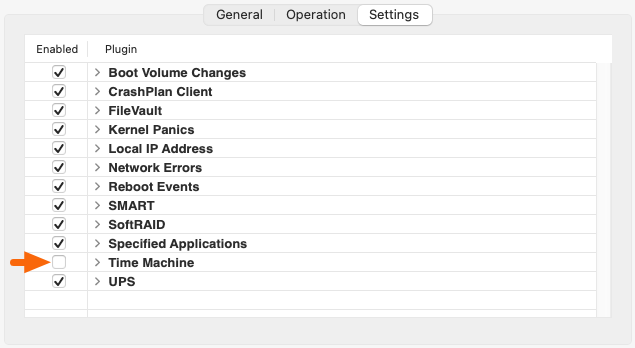
Some plugins can be enabled or disabled from the System Preferences. Disable a plugin by deselecting the Enabled checkbox next to the plugin in the Settings tab of the Monitoring Client Preference Pane.
Disable/Enable a Plugin with RunClient:
Plugins can be Disabled/Enabled using the appropriate --disable/--enable flag when calling RunClient with the --plugin [plugin_name] flag.
sudo /Library/MonitoringClient/RunClient --disable --plugin [plugin_name]
sudo /Library/MonitoringClient/RunClient --enable --plugin [plugin_name]
Locate the actual plugin name in /Library/MonitoringClient/Plugins
As an example, to disable root capacity:
sudo /Library/MonitoringClient/RunClient --disable --plugin check_root_capacity
Windows
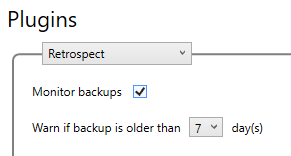
Some plugins can be set not to monitor from the Control Panel, providing the effect of enabling or disabling. To completely disable a plugin, RunClient.exe should be used.
Disable/Enable a Plugin with RunClient:
Plugins can be Disabled/Enabled using the appropriate --disable/--enable flag when calling RunClient.exe with the --plugin [plugin_name] flag.
C:\Program Files (x86)\Monitoring Client\RunClient.exe --disable --plugin [plugin_name]
C:\Program Files (x86)\Monitoring Client\RunClient.exe --enable --plugin [plugin_name]
Locate the actual plugin name in /Library/MonitoringClient/Plugins
As an example, to disable root capacity:
C:\Program Files (x86)\Monitoring Client\RunClient.exe --disable --plugin check_root_capacity