Autotask Plugin Status Updates
Plugin Status Updates allow for more efficient ticket handling, by allowing Watchman Monitoring to update the ticket status based on a change in the current plugin status. When the status of a Plugin changes on an open ticket, Watchman Monitoring has the option to automatically set a ticket to a status of your choosing. Additionally, if the plugin result returns to a warning state, the status will also be updated to the status of your choosing. The following article describes setting these status options along with adding additional status(es) to Autotask.
Configuring Plugin Status Updates
Navigate to Autotask > Ticket Creation.
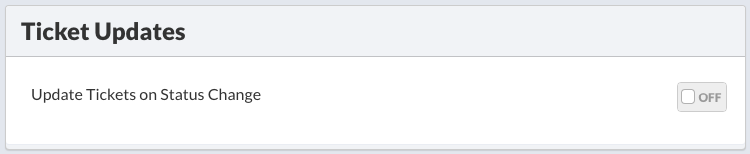
Scroll down to Ticket Updates, and enable updates by setting to On.

Once enabled, options are displayed to set a ticket status when the plugin result’s status change, and the status if a plugin goes back to a warning state.
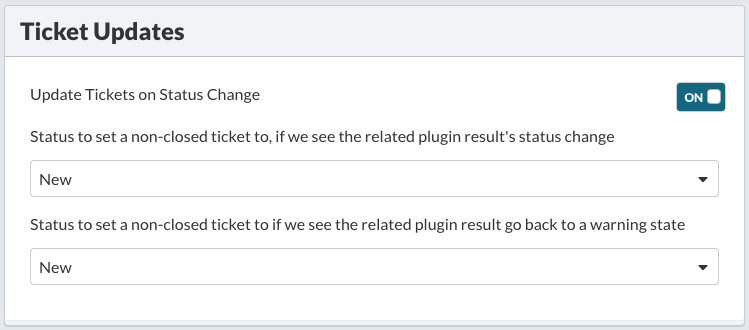
Select the status(es) to set a ticket when the plugin result’s status change, and the status if a plugin goes back to a warning state.
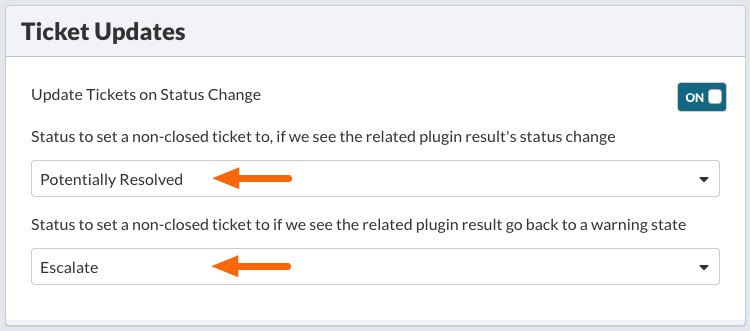
Click Save & Continue at the bottom of the Ticket Creation settings.

Adding Additional Ticket Status to Autotask
To add additional Ticket Statuses to Autotask, navigate to
Autotask menu > Admin > Features & Settings.
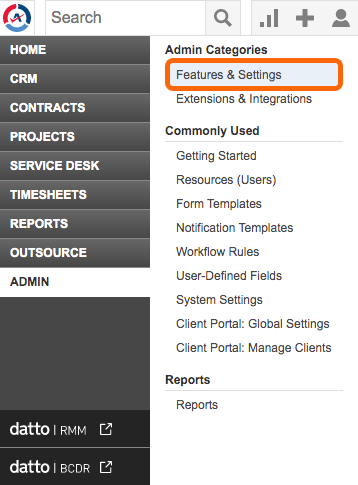
Under Projects & Tasks > Task & Ticket Statuses.

Click the + New button.
Add in your preferred ticket status(es), assign an SLA (if appropriate), and click Save.

Permalink: https://watchmanmonitoring.com/autotask-plugin-status